



Webflow and WordPress dominate website creation, but they solve different problems.
Your marketing team wants to update the homepage without filing dev tickets. WordPress makes them wait. Webflow hands them the keys. But if you're building a membership site with custom user roles and 10,000 blog posts, WordPress scales where Webflow hits plan limits.
This isn't about which platform is "better." It's about which one fits what you're actually building. We'll compare features, performance, pricing, and developer talent so you can make the right call.
Webflow vs WordPress Comparison
Both platforms work well. The question is whether you value design speed and convenience (Webflow) or ownership and unlimited expandability (WordPress).
Webflow gets you live fast with built-in everything. WordPress, on the other hand, gives you the keys to the engine—but you're responsible for tuning it.
Learn more on Forbes’ Webflow vs. WordPress article.
Features Comparison: Webflow vs WordPress
Webflow shines when design quality and launch speed matter most. WordPress wins when you need custom functionality, complete ownership, or plan to scale significantly.
Think of it this way: Webflow is the apartment with utilities included. WordPress is the house you own, but you're fixing the plumbing yourself.
Get more details from Webflow’s feature comparison guide.
Webflow vs WordPress Pricing Breakdown
Webflow pricing is predictable. You pay monthly, everything's included, and you know what it costs upfront. The downside? You're locked in, and pricing climbs as you add features or scale.
WordPress is free to use, but setup costs hit fast—hosting, premium themes, paid plugins, and developer time. The upfront investment is higher. However, you own the infrastructure and control long-term costs.
For most startups, Webflow makes sense early on. For content operations or ecommerce sites planning to scale, WordPress pays off over time.
Pro tip: Factor in developer costs too. Webflow developers run $4,500-6,500/month in Latin America. WordPress developers are $5,000-7,500/month. If you're planning to hire, those numbers matter.
Best Use Cases: Webflow vs WordPress
Deciding between Webflow vs WordPress determines your development team, timeline, budget, tech stack, and future roadmap.
Choose Webflow if:
- Your marketing team needs to update content without waiting on developers
- You want fast launch timelines with minimal maintenance overhead
- Design quality and animations matter more than backend flexibility
- You're building portfolios, agency sites, or product marketing pages
Example: A SaaS startup launching its first marketing site. Webflow lets them iterate quickly without managing hosting or security. Instead of spending two months on setup, they're live in two weeks.
Choose WordPress if:
- You're building a content-heavy site with hundreds or thousands of pages
- You need advanced ecommerce: subscriptions, memberships, custom checkout flows
- Custom functionality requires specific plugins or integrations
- You want full ownership and control over hosting, data, and architecture
Example: A media company publishing daily articles with multiple authors, custom taxonomies, and ad integrations. WordPress scales with their content operations without hitting plan limits or forcing them into expensive tier upgrades.
Learn more about the best CMS platforms 2026 on TechRadar’s ultimate list here.
Recruiting Webflow vs WordPress Developers in LatAm on Tecla
Choosing a platform is half the decision. Hiring the right developer to execute it is the other half.
At Tecla, we source elite developer talent from Latin America and vet rigorously to ensure every professional in our network is collaboration-ready. Instead of expensive agencies that lock you into long contracts, you get flexible, affordable hiring solutions.
World-class skills
Our Webflow and WordPress developers are screened for proven skills and industry experience. They've built production sites, not just side projects.
Timezone alignment
Our entire network is in Latin America, which means significant workday overlap. Bugs get fixed during your afternoon, not discovered in Slack messages the next morning.
Cost efficiency
Competitive developer salaries in LatAm are 40-50% less than US rates. As a result, you can hire senior talent without Bay Area pricing.
Long-term collaboration
Our WordPress and Webflow developers stay for years, not months. They're building careers, not filling short-term contracts.
Faster updates and iteration
Average time-to-match: 7 days. You're interviewing vetted candidates next week, not three months from now.
Cultural and business alignment
We recruit developers who understand US workplace culture and succeed in hybrid teams. No 12-hour feedback delays. No miscommunication on project requirements.
In our network: Webflow developers, WordPress developers, full-stack web developers, and frontend developers. Partner with Tecla to hire professionals who build, maintain, and scale your site.
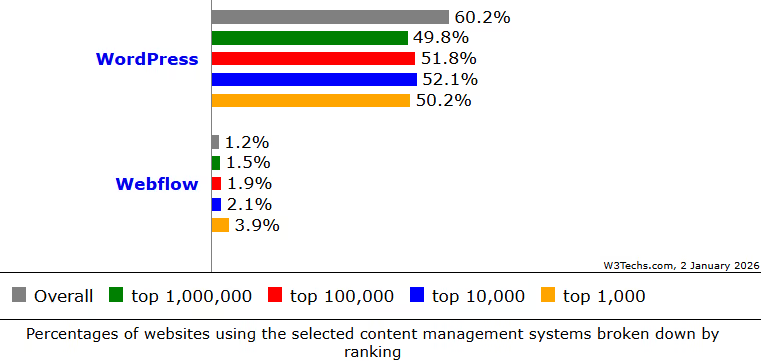
Get CMS market share statistics for 2025 from Search Engine Journal.
Final Take
Both Webflow and WordPress are powerful platforms for building your business website. Webflow is ideal for creating visually impressive sites quickly with built-in features and minimal maintenance. WordPress, meanwhile, offers flexibility and scalability for content-heavy or ecommerce sites that need custom functionality.
The right developer makes the difference. Tecla connects companies with top-tier Webflow and WordPress developers from LatAm for long-term success. Get in touch with our talent specialists to recruit top web developers and start building.